This guide explains how to use Library Reservations to review pending reservation requests and decide whether to fulfill or cancel them.
Short summary
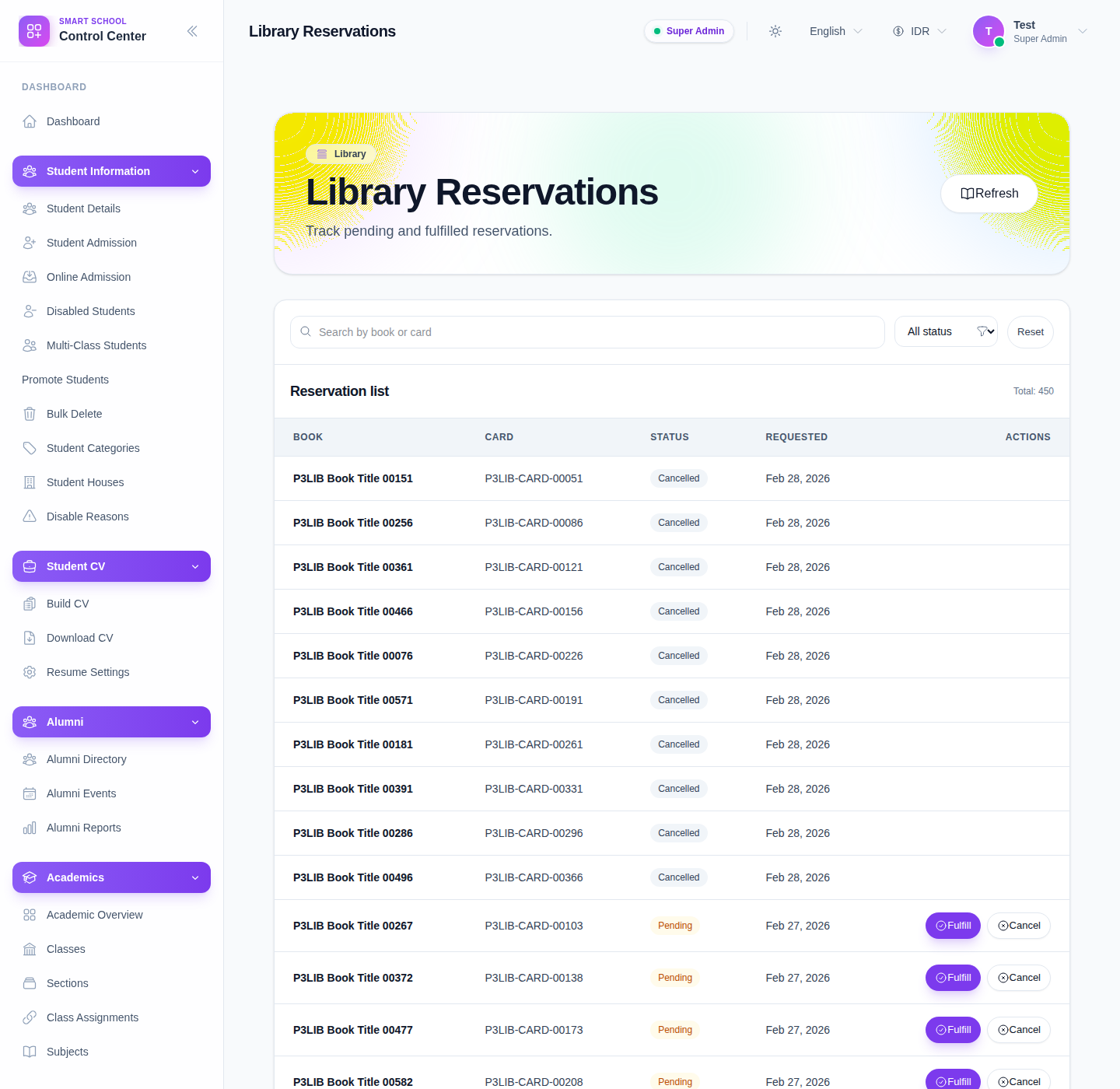
The current reservations page is a filter-first list with search, status filtering, a total counter, view-only permission messaging, and row-level Fulfill or Cancel actions for pending reservations.
Before you start
- Confirm whether you are only reviewing reservations or also managing them.
- Check that the member and book are still valid before fulfilling a pending request.
- Use status filtering so you do not accidentally act on a fulfilled or cancelled row.
Navigation path
Library -> Reservations
Step 1: Open Library Reservations
Open Library in the sidebar and choose Reservations.
Step 2: Filter the reservation list
The current filter area includes:
- Search by book or card
- All status
- Reset
Use filtering first, especially when the queue mixes pending, fulfilled, and cancelled rows.
Step 3: Review the table before acting
The reservation table currently shows:
- Book
- Card
- Status
- Requested
- Actions
Use these columns to confirm that the request belongs to the correct borrower and still represents a real demand that should be processed.
Step 4: Fulfill a pending reservation
When a row is still Pending and your account has manage permission, the page shows Fulfill.
Use Fulfill when:
- the requested book is ready to move forward
- the member is still valid for borrowing
- the reservation should advance into the next real circulation step
After fulfilling, reload or recheck the table so the new status is visible.
Step 5: Cancel a reservation when it should not proceed
Use Cancel when:
- the request is no longer valid
- the member no longer needs the book
- the reservation was created in error
The page updates the reservation state so the queue reflects the real work still waiting.
Step 6: Respect view-only mode
The current page shows a notice when the operator only has view access.
In that case:
- you can still inspect the queue
- pending rows remain visible
- fulfill and cancel should be handled by a user with manage permission
This matters because reservation review and reservation action authority are not always the same responsibility.
Verify the result
- the row appears under the expected status
- the total count and visible queue make sense after the action
- only pending rows are acted on
- fulfilled and cancelled rows remain auditable through status filtering
Troubleshooting
| Issue | Likely cause | What to do |
|---|---|---|
| No action buttons appear | The account has view-only access | Ask a user with manage permission to process the request |
| The row is hard to find | Search or status filters are too narrow | Reset the filters and search again by card or book |
| A request should be actionable but is not | The row is no longer pending | Recheck the status before trying to act |
| The page shows no reservations | The current filter scope has no matching rows | Clear the filters and reload the queue |