This guide explains how to use Content Types inside Download Center to standardize the file categories used across uploads and shared materials.
Before you start
- Decide which content categories the school actually needs.
- Keep the names short and consistent so other staff can recognize them later.
- Confirm whether the new type should replace an existing label or sit alongside it.
Important: content types shape how uploads are organized everywhere else in Download Center. Use stable naming conventions before you create or rename a type.
Navigation path
Download Center -> Content Types
Step 1: Open the Content Types page
Go to Download Center and open Content Types.
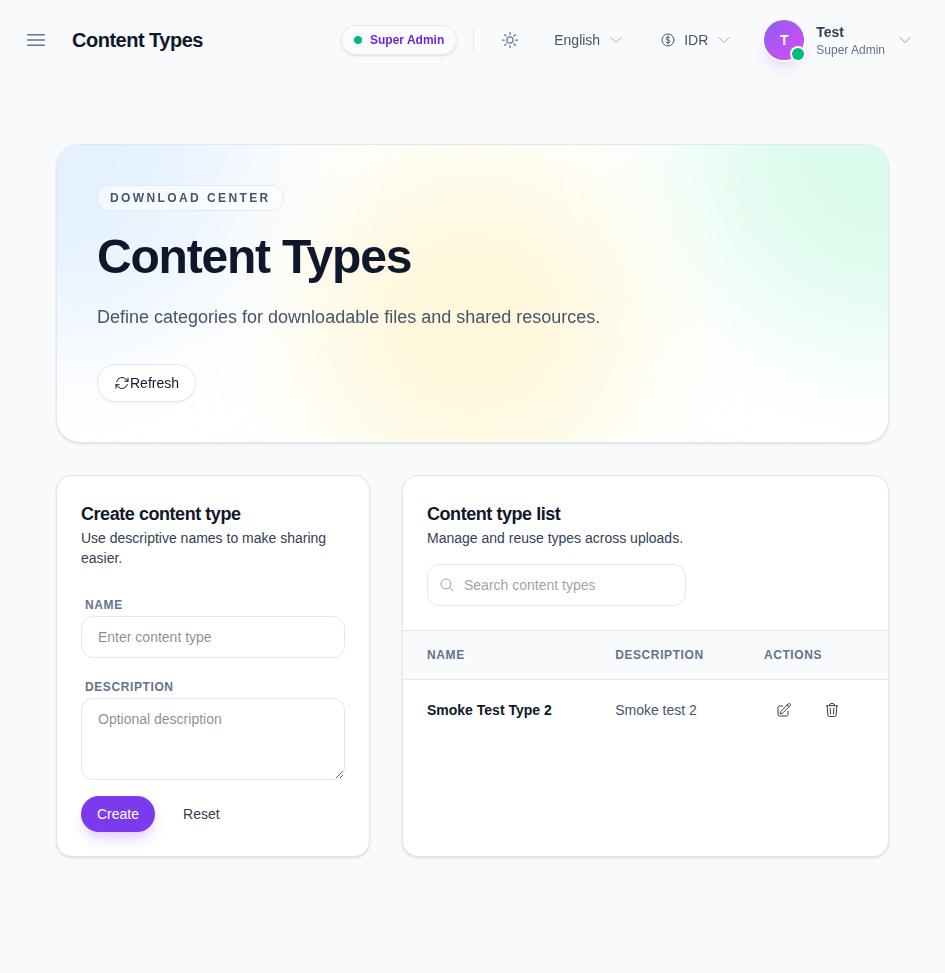
The page shows:
- a Create content type form
- a searchable content-type list
- edit and delete actions in each row
Step 2: Review the existing types
Use the search field to check whether a type already exists before you create another one.
Each row shows:
- the content type name
- the description
- edit and delete actions
If a type already covers the use case, reuse it instead of creating a duplicate.
Step 3: Create a new content type
Enter the type name and optional description in the form on the left, then click Create.
Use a name that other staff can understand quickly, such as:
- assignments
- notices
- syllabus
- policy documents
- media assets
Keep the names short enough to reuse in upload workflows.
Step 4: Edit or delete an existing type
Use the row actions to:
- edit a type when the label needs to be refined
- delete a type when it is no longer used
Only delete a type when you are sure no active uploads depend on it.
Step 5: Reuse the type in upload workflows
Once a type exists, the Upload Content page can use it to classify files, videos, and other shared materials.
That is the main reason to keep the type list tidy: every later upload becomes easier to search and manage.
Verify the result
Use this checklist after changing content types:
- the type name is clear and reusable
- the description matches the intended category
- the content type appears in the list after saving
- duplicate labels were not created by accident
Expected result: the Download Center type list contains clean reusable categories that other workflows can use when uploading content.
Troubleshooting
| Issue | Likely cause | What to do |
|---|---|---|
| Create is unavailable | Your role does not have content-type permission | Recheck the Download Center permissions |
| A duplicate type appears | The category already existed under a similar name | Standardize the label and keep one reusable type |
| Search does not find a row | The query is too specific or the list is empty | Clear the search and review the full list |
| Delete feels unsafe | Other uploads may still depend on that type | Reuse or rename the type instead of removing it |